2000 Form 220 Instructions
-
Work and Leave 2OT/Holiday Time (Compensatory Time)
-
FMLA
-
COMMENTS
-
Week Total
-
Annual Leave
-
Sick Leave
-
Personal Holiday (PHOL)
-
Moving to Other Months
-
TOTALS PAGE
-
Overtime
-
FMLA
-
Comments
-
Totals
INTRODUCTION
The 220 form is used to
keep
track of things like your work hours per week, leave balances, overtime
and FMLA time. This electronic, Microsoft Excel 5.0 version has been
produced
by a team at the Department of Orthopaedics in the hopes that you will
find it more versatile and easier to use than the hard copy. However,
this
electronic version should be considered a "working copy." It does not
take
the place of the original hard copy which will still require your and
your
supervisor's signatures each month. The 220 hard copy is an official UW
document that will follow you should you switch departments at the
University.
If you've never used the electronic version before, please keep
reading.
If you are familiar with the electronic 1997 version of the 220 and
just
want information on what's new for 2000, please skip to the section
entitled
"WHAT'S NEW FOR 2000."
If you have any
questions
regarding the use of this 220, please feel free to contact Mike Burdett
at 685-4350 or via email at orthohlp@u.washington.edu.
COMPONENTS OF THE 220
As you work, use leave, or
work overtime, you'll want to record these actions on the electronic
220.
Each month of the year is represented on the 220 in a similar manner.
The
days of the week appear down the left-hand side in order and the
different
types of work, overtime, and leave are listed across the top.
Darkly-shaded
rows denote days that fall on a weekend and University-recognized
holidays
are marked with light shading. The column headers and their meanings
are
as follows:
Work and Leave
-
WORK - Usually 8 hours
per
weekday. (You could work 4 - 10 hour days, in this case put 10 here.)
-
ANNL - Annual Leave,
also known
as paid vacation leave.
-
SICK - Sick Leave, paid
leave
in cases of disability, injury, illness, etc.
-
LWOP - Leave Without
Pay, unpaid
leave for use when an employee's paid leave balance is insufficient to
cover an absence.
-
HOL - Holiday Leave,
paid leave
for University-recognized holidays such as New Year's Day and
Christmas.
Holidays for 2000 should already have an "8" in this column.
-
PHOL - Personal Holiday
Leave,
one day per calendar year. The PHOL balance at the bottom of each month
is 8 hours (1 day) until you use your personal holiday. A personal
holiday
must be taken as one full day of paid leave. It cannot be used
incrementally
(an hour on one day, a couple more another day, etc.).
-
CIVIL - Civil Leave,
paid leave
granted for jury, witness or other subpoenaed civil duty.
-
BRVMT - Bereavement
Leave.
One day of paid leave is granted an employee for a death in the family
or household member. Up to two more days may be granted by the
employing
official.
OT/Holiday Time (Compensatory Time)
-
OT - Overtime. This
field should
be used if you have worked in excess of your full-time daily shift or
if
you have worked more than 40 hours in the work week. See your
supervisor
if you have questions about this. The actual excess work hours
should
be recorded in this field. For example, if I my normal quitting time is
5pm and I work until 7pm, I would put an "8" in the "WORK" column for
that
day (since I worked my normal eight hours) and a "2" in the "OT" column
(since I worked two hours of overtime). The two hours of overtime are
automatically
converted into time-and-one-half (2 x 1.5 = 3) at the bottom of the
page.
-
HT - Holiday Time. This
is
different than Holiday Leave (HOL) and is used by employees who accrue
compensatory time at a 1-to-1 rate instead of at time-and-one-half.
-
PAID - Paid OT/Holiday
Time.
As you accrue overtime or holiday time, you can either be paid for it
or
have it accrue and use it as paid leave later. If you'd like to have
your
overtime balance paid, indicate the number of hours you are being paid
for in this column.
For example, let's say on
Jan.
29 I work two hours of overtime and would like to get paid for it. As
explained
above, I'd put an "8" in the WORK column (since I normally work eight
hours
per day) and a "2" in the OT column (to account for the 2 hours of
overtime).
At the bottom of the page, the 2 hours have been converted to 3 hours
at
time-and-one-half (2 x 1.5 = 3). I now have three hours to play with. I
can get paid for it or use it as leave later. In this case, I want to
get
paid for it, so I would place a "3" in the PAID column. This is how the
OT portion of the page would look:
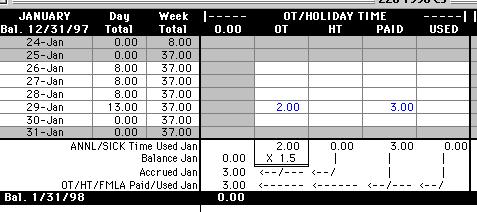
As you can see in the
totals
section, there were 3 hours of overtime accrued in January and 3 hours
were paid, leaving a balance of zero.
-
USED - Used OT/Holiday
Time.
Using the above example, let's say that instead of getting paid for the
overtime I wanted to use my 3 hours as paid leave instead. On Jan. 23,
I work two hours of overtime. I place an "8" in the WORK column and a
"2"
in the "OT" column for that day. I now have a balance of 3 hours to
play
with. The next week, I want to leave 3 hours early on Jan. 30 and use
up
my 3 hour balance. I put a "5" in the WORK column for the 30th (because
I'm only working 5 hours that day) and a "3" in the USED column
(because
I am using an overtime balance as paid leave).
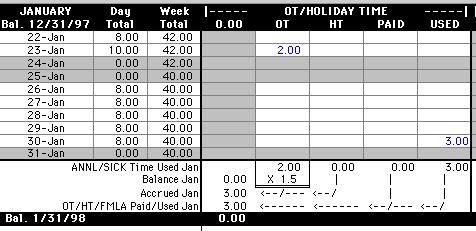
In this case, the totals
section once again shows 3 hours of overtime accrued in January and 3
hours
used, leaving a balance of zero.
FMLA
Under the federal Family
Medical
Leave Act, eligible employees are entitled to up to 12 weeks (480
hours)
of leave (paid or unpaid) per calendar year for certain family medical
situations (illness, maternity leave, care for a sick parent, etc.).
Use
of FMLA leave must be discussed with your supervisor prior to using it.
The FMLA section of your 220 is there to keep a running total of the
Family
Medical Leave you have taken during the calendar year. It is your
supervisor's
responsibility to fill out this section if necessary.
COMMENTS
If you scroll down the
month
page, you'll notice below each month there is a comments section that
looks
like this:
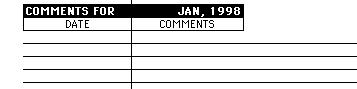
This section is for use
by you or your supervisor should anything on your 220 require further
explanation.
For example, if you come in late to work because of an early morning
doctor's
appointment (a use of sick leave) and then leave work early to start a
vacation (a use of annual leave), you may want to note in the comments
section why two different types of leave are being used on the same day.
DAILY USE OF YOUR 220
As you input work, leave,
and
overtime hours onto your 220, a few things will happen automatically:
Week Total
Your work hours in a given
week (Sunday through Saturday) will be totaled up under the "Week
Total"
column. This makes it easy to calculate if an employee working at 100%
is working more than 40 hours per week.
Annual Leave
Your annual leave balance
is
carried forward from the previous year onto the top of the January,
2000
page. The amount of annual leave you use throughout the course of a
month
is totaled in the "ANNL/SICK Time Used" row at the bottom of each
month.
This figure is subtracted from the balance you had at the beginning of
the month to arrive at a "Balance" figure. The number of hours of leave
you accrued during that month is then added to your "Balance" figure.
This
is the number of hours carried over to the next month. Take a look at
the
example below:
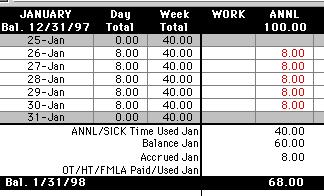
I started out this month
with 100 hours of annual leave. I took 5 days off (Jan. 26-30) which
used
40 annual leave hours. This left me with a balance of 60 hours of
annual
leave. I then accrued 8 more hours over the course of the month,
leaving
me with 68 hours of annual leave to be carried over to February.
The amount of leave you
accrue during the month is added at the very end because you can't use
leave until you accrue it. So, if I had a balance of zero at the start
of January, I couldn't use the eight hours I accrued in January until
February.
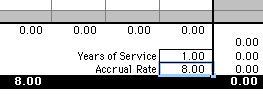
The amount of annual
leave
you accrue in a month is based on the percentage of time you are
currently
working (An employee working at 80% time will accrue 80% of the
vacation
time per month that a full-time employee would accrue.) and the number
of years of service you have with the University. Your years of service
and current monthly annual leave accrual rate should be filled out in a
section in the middle of the 220 that appears like this:
The last thing you
should
do each month is input the amount of annual leave accrued during the
month
near the end of the ANNL column in the "Accrued Jan" row, as below:
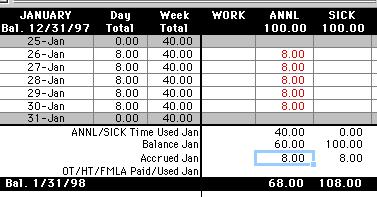
Doing this at the end of
the month ensures that you don't trick yourself into thinking you have
more leave available than you actually do, since in this case you can't
use the 8 hours accrued in January until February.
When submitting a Leave
Request Form to your supervisor for approval of annual or sick leave,
please
update your electronic 220 to include the time off you are requesting.
Doing so will enable you and your supervisor to verify that you have
enough
leave to cover the leave requested. In the meantime, you may be asked
to
adjust your 220 form accordingly. Please be aware that Leave Request
Forms
are required for all time off. They are used for audit purposes and
this
department is required to hold them on file for a period of 6 years.
Sick Leave
Like annual leave, the
amount
used during a month is subtracted from the beginning balance. The
amount
accrued during the month is added to the remaining balance just before
it is carried over to the next month. Every full time employee accrues
sick leave at a rate of 8 hours (1 day) per month, regardless of years
of service with the University. An employee working at 80% time will
accrue
80% of 8 hours or 6.4 hours of sick time per month. As with annual
leave,
the last thing you should do at the end of a month is input the amount
of sick leave you accrued during the month near the end of the SICK
column
in the "Accrued Jan" row.
Personal Holiday (PHOL)
As mentioned earlier, the
balance
of this column will remain at 8 hours until you use your personal
holiday.
You must use your personal holiday by the end of the calendar year as
it
does not carry over to the next year if left unused.
Moving to Other Months
You can move from month to
month by clicking on one of the tabs at the bottom of the page (see
blow).

TOTALS PAGE
The last page of the 220
workbook
(entitled "220 Template 2000") contains a summary of your leave and
overtime
activity throughout the course of the year. Most of the cells on this
page
are locked so that the equations they contain cannot be accidentally
modified.
A couple of the fields on this page are worthy of note:
Anniversary Date - This
is the date that you started as a salaried, Classified Staff employee
at
the University. Your "Years of Service" figure (and hence your annual
leave
accrual rate) is derived from this date.
Vacation Accrual Month -
The best way to explain this is to use examples. Let's say I started
out
at the University in a salaried, Classified Staff position on 1/1/98
(This
is my Anniversary Date.). After one year, my annual leave accrual rate
goes up from 8 hours per month to 8.67 hours per month. My Vacation
Accrual
Month is the month of the year at which my accrual rate will change. In
this case, it is January, and in January of 1999 my vacation accrual
rate
will jump up to 8.67. However, let's say my position started on
1/16/98.
In this case, half of the month has gone by before I've started my
position.
I don't get credit for January and my Vacation Accrual Month becomes
February.
So, my vacation accrual rate won't go up to 8.67 until February of 1999.
Please take a moment to
ensure that the information in these two fields (and in the Accrual
Rate
field on each month) appears to be correct.
WHAT'S NEW FOR 2000
Because of the addition of
new columns, it is difficult to view an entire month at once on one's
monitor.
As a result, the Day Total and Week Total columns (used to highlight
possible
overtime situations) have been moved from the far right of each month
to
the far left.
Overtime
Overtime has been expanded
to several columns to better account for being paid for overtime, using
accrued overtime as leave, etc.
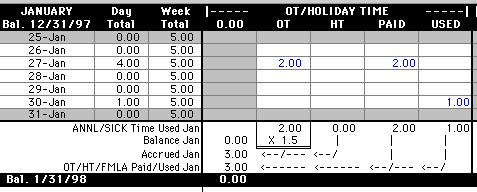
The number of overtime
hours
you have worked are placed in the OT column. The number of Holiday Time
hours you have accrued are placed in the HT column (This is for
employees
who accrue compensatory time at a rate of 1:1 instead of at
time-and-one-half.).
The number of overtime or holiday time hours you'd like to get paid for
goes into the PAID column. If you choose to used your accrued overtime
as paid leave later, the hours you use as leave are entered into the
USED
column. For example, in the table above, I worked 2 hours of overtime
on
Jan. 27. This is converted into time-and-one-half (2 x 1.5 = 3) at the
bottom of the month in the "Accrued Jan" row. I now had 3 hours of
compensatory
time to use or get paid for. I chose to have 2 hours of this time paid
to me by putting the 2 in the PAID column for that day. On Jan. 30, I
left
work and hour early, so my remaining hour of compensatory time was
placed
in the USED column. I ended the month with a balance of zero.
FMLA
Under the federal Family
Medical
Leave Act, eligible employees are entitled to up to 12 weeks (480
hours)
of leave (paid or unpaid) per calendar year for certain family
situations
(maternity leave, care for a sick parent, etc.). Use of FMLA leave
must
be discussed with your supervisor prior to using it. The FMLA
section
of your 220 is there to keep a running total of the Family Medical
Leave
you have taken during the calendar year, and it is your supervisor's
responsibility
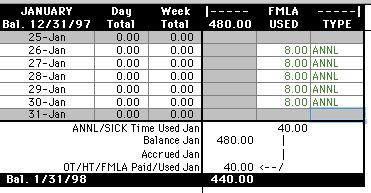
to fill out this section if necessary. The FMLA section (when used)
will
look something like this:
Comments
A Comments section has been
added to the bottom of each month (see below).
This section is for use
by you or your supervisor should anything on your 220 require further
explanation.
For example, if you come in late to work because of an early morning
doctor's
appointment (a use of sick leave) and then leave work early to start a
vacation (a use of annual leave), you may want to note in the comments
section why two different types of leave are being used on the same day.
Totals
The last page of the 220
workbook
is still the totals page (called 220 Template 2000) which serves as a
summary
of your leave and overtime activity over the course of the year. The
only
significant change here is that a section has been added to track FMLA
balances.
That's about it! Once again, if you have any
problems
in the use of your 220 form, please feel free to contact Michael
Burdett
via email at orthohlp@u.washington.edu
or by phone at 685-4350.