Firstly, to enhance the capacity of the existing MASS-based graph
database (DB) system (GraphPlaces and
VertexPlace) in terms of handling graph datasets with
various property information about nodes and relationships, we have
re-engineered the existing system in accordance with the property
graph model.
Secondly, to make the MASS-based graph database system capable to support a query language for creating, manipulating, and retrieving graph data, we have implemented a completion process to integrate Cypher with the MASS-based graph DB system.
The code for the enhanced MASS-based graph DB system is in mass_java_appl/QueryGraphDB branch and mass_java_core/QueryGraphDB branch. For more information of the files and folders added and/or amended in this project, please refer to mass_java_app/QueryGraphDB branch/QueryGraphDB/README.me.
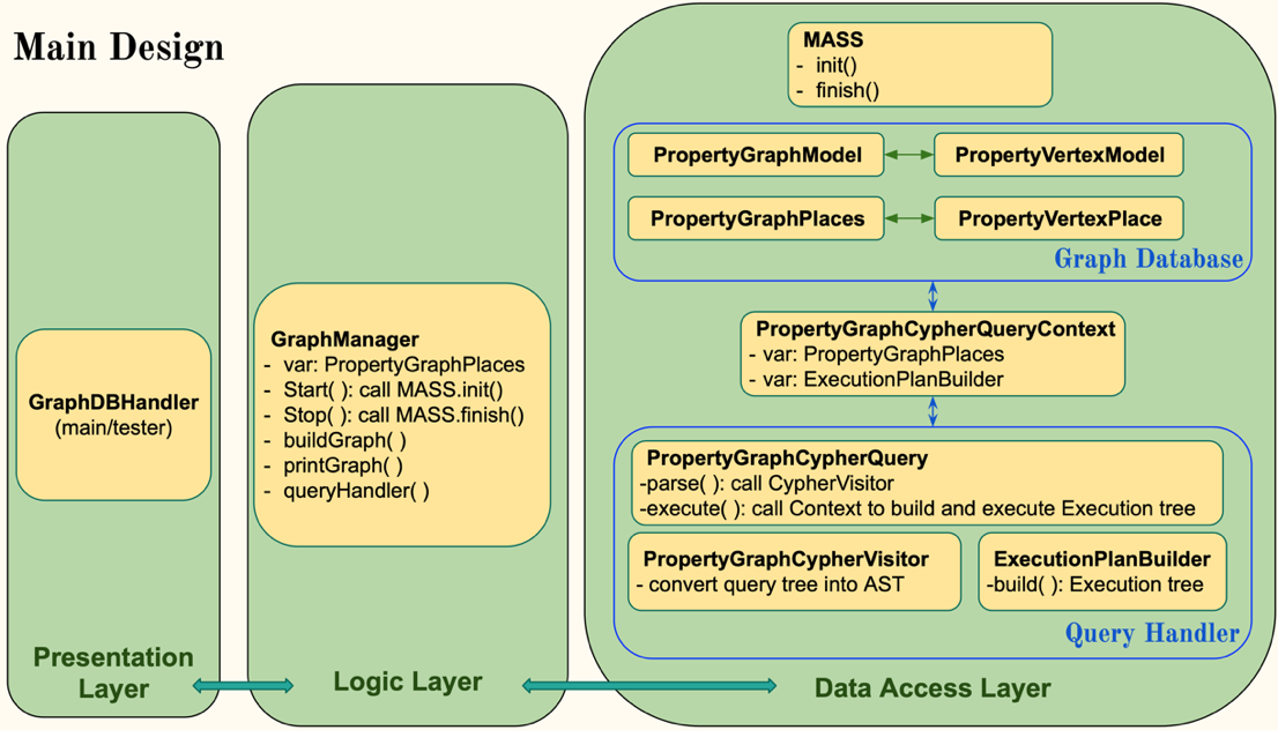
This is to illustrate the entire design and implementation of the whole project. It follows a three-tier architecture pattern, with presentation layer, logic layer and data access layer.
Presentation Layer is about the interface that users interact
with. Users have no direct access to the underlying graph data or
knowledge of the DB structure. Users make requests to the system through
the GraphManager component.
Logic Layer serves as an intermediary between the presentation
layer and the data access layer. This layer contains the
GraphManager class, which exposes create, read, or update
methods to users, providing a high-level interface for interaction with
graph DB.
Data Access Layer is where the actual agent-based property graph
DB resides. Users, through the GraphManager, interact with
the DB using Cypher queries.
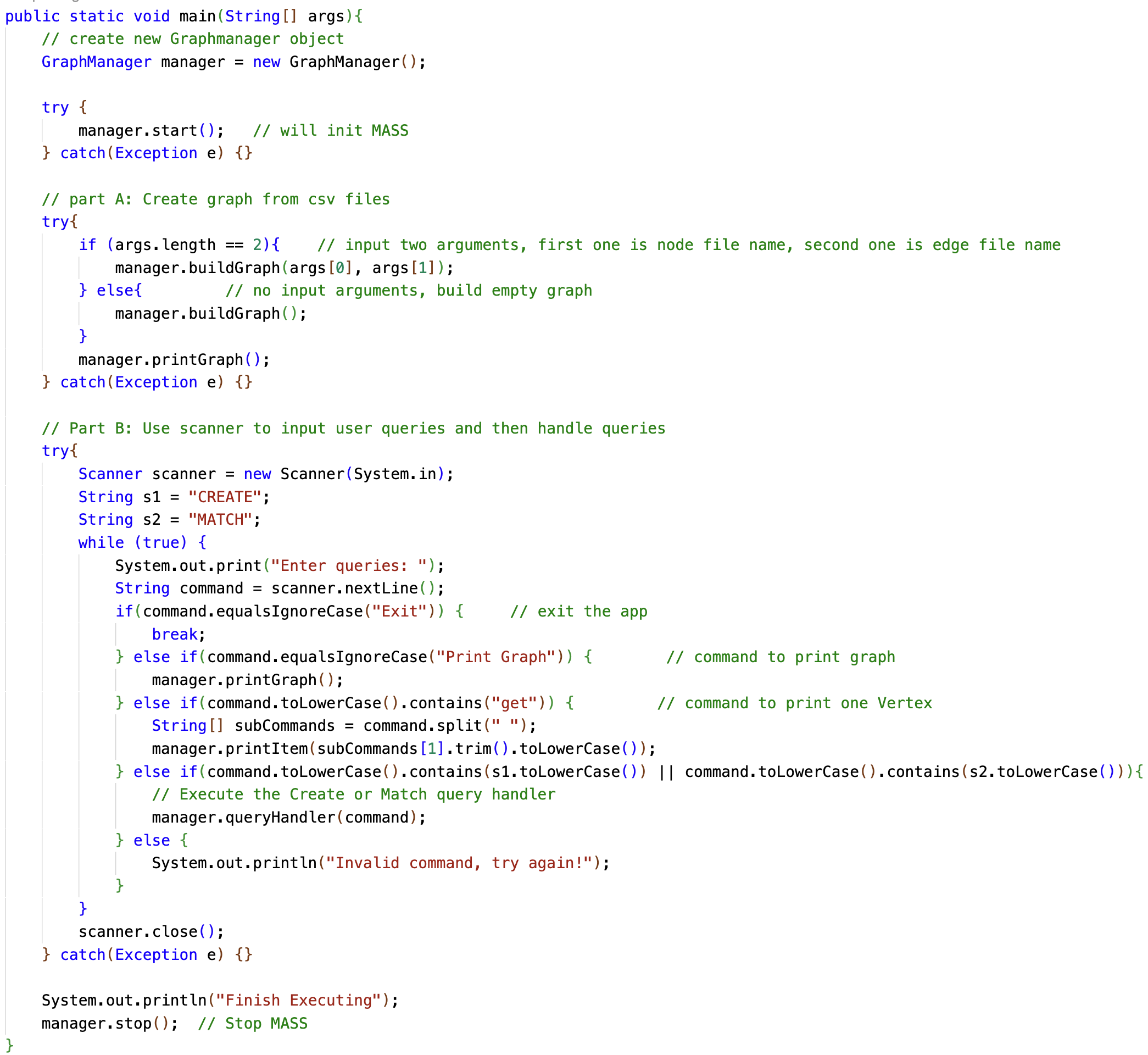
This is an example of a main program that interacts with the
GraphManager class to manage a MASS-based graph database
and execute Cypher queries. It follows the process as listed below:
Initialize a GraphManager instance.
Call GraphManager’s start() method to start MASS
system.
Call GraphManager’s buildGraph() methods to build a
graph, either an empty one or from csv files.
Users can call GraphManager’s printGraph() to
visualize the graph DB built in MASS system.
Users can query the system by calling GraphManager’s
queryHandler() method.
Users can quit the system by typing “Exit” in terminal.
The GraphManager class is responsible for managing a
property graph using the MASS components. It includes methods for
initializing and shutting down the MASS library, building graphs from
CSV files, and handling queries. Below is a detailed documentation of
the class and its methods.
PropertyGraphPlaces object, which is the key
component to manage our graph DB system and can be accessed by
GraphManager.void start(): Initializes the MASS library. Whenever uses wants to access the MASS-based graph DB system, they need to call start() first to initialize the MASS library.
void stop(): Shuts down the MASS library.
void buildGraph(): Builds an empty graph.
void buildGraph(String csvNodeFileName): Builds a graph with nodes specified in a CSV file.
void buildGraph(String csvNodeFileName, String csvRelationFileName): Builds a graph with nodes and edges specified in CSV files.
void printGraph(): Prints the graph stored in PropertyGraphPlaces.
void printItem(Object uniqueID): Prints a single PropertyVertexPlace item by its unique ID.
void queryHandler(String queryString): The parameter of queryString represents a complete query clause and needs to follow Cypher query syntax. This method handles Cypher queries via Cypher compilation process and interacts with PropertyGraphPlaces to explore graph DB and fetch results.
To enhance the functionality of the existing system in accordance
with the property
graph model, a new PropertyGraphPlaces class and a new
PropertyVertexPlace class are designed to manage graph DB
system and store graph data with nodes and edges containing property
information.
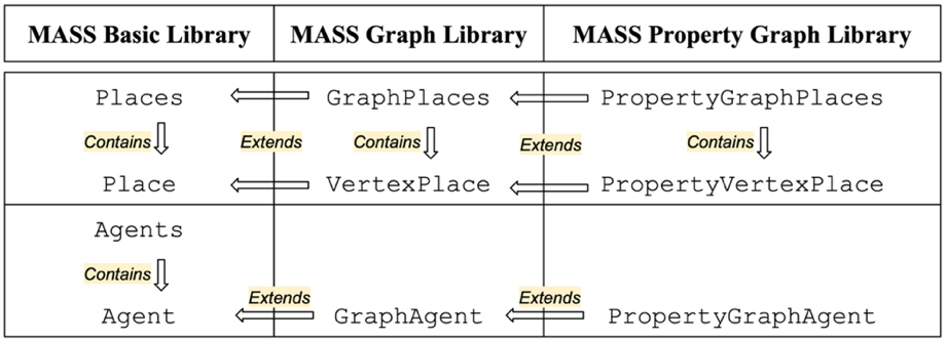
PropertyGraphPlaces extends from
GraphPlaces and contains a list of
PropertyVertexPlace, which further extends from
VertexPlace.
The PropertyGraphPlaces class serves as a crucial
component for managing the property graph DB within the MASS Java
framework. This class is designed to facilitate the creation,
manipulation, and analysis of property graphs, composed of individual
vertices represented by PropertyVertexPlace instances.
int addPropertyVertex(Object itemID_Original, List
This method allows for the addition of new vertices to the graph. Upon invocation, addPropertyVertex() method creates a new PropertyVertexPlace instance with the specified attributes and adds it to the graph.
Parameters:
‘itemID_Original” is a unique ID for the vertex
‘labels’ is a set of descriptive tags for categorizing the vertex
‘properties’ is about the additional attributes associated with the vertex.
Returns int: An integer represents the MASS internal ID for the vertex.
boolean setRelationEdge(Object fromItemID_Ori, Object
toItemID_Ori, List
This method enables the creation of edges between two vertices, specifying the type of relationship and any associated properties.
Parameters:
Returns boolean: ‘true’ if the relationship edge is added to the graph database successfully, and ‘false’ otherwise.
PropertyGraphModel getPropertyGraph()
This method returns a representation of the entire property graph, including details about each vertex and its associated properties and relationships. This functionality enables users to inspect the graph’s structure and content, facilitating tasks such as debugging, validation, or visualization.
Returns PropertyGraphModel: The model representing the entire property graph.
The PropertyVertexPlace class is designed to represent nodes or edges in a graph structure in accordance with the property graph model.
Below are the key attributes of the PropertyVertexPlace class: * ‘ItemID’: This attribute stores a unique ID for each node or vertex within the graph. * ‘labels’: Represented as a set, this attribute captures the descriptive tags for categorizing the node or vertex. * ‘nodeProperties’: A map structure utilized to store the properties associated with the node or vertex, facilitating the storage of key-value pairs denoting various attributes. * ‘toRelationship’ and ‘fromRelationship’: These maps are employed to record relationship information related to both outgoing and incoming connections of the node or vertex. They store relationship details including neighborID, and the types and properties of respective relationships. * ‘nextVertex’: This list contains the vertex IDs of nodes where an Agent is expected to spawn and subsequently migrate to.


The Cypher compilation process begins with the input of a Cypher query text, which specifies the query clause with patterns to be performed on the graph data. Once the Cypher query is received, it undergoes parsing into a parse-tree, a hierarchical representation of its syntactic structure, and then being translated into an Abstract Syntax Tree (AST), which captures the essential semantic structure of the parse-tree. Upon the construction of AST, it is transformed into an execution plan, which is essentially a tree of execution steps required to fulfill the query efficiently. Once the execution plan is generated, it is executed against the agent-based property graph DB and the results of the query execution are retrieved.
Currently, compilation of Cypher CREATE and MATCH clauses have been completed. To execute these two clauses, users need to call GraphManager’s queryHandler() method with query clause as input parameter.
Cypher CREATE clause examples
Example 1: Creating a Single Node
CREATE (n:Person {name: ‘Alice’, age: 30})
This query creates a node with the label Person and sets its name property to ‘Alice’ and its age property to 30.
Example 2: Creating Multiple Nodes
CREATE (a:Person {name: ‘Alice’, age: 30}), (b:Person {name: ‘Bob’, age: 25})
This query creates two nodes with the label Person, one for ‘Alice’ and one for ‘Bob’.
Example 3: Creating a Relationship Between Two Nodes
CREATE (a:Person {name: ‘Alice’, age: 30})-[:KNOWS]->(b:Person {name: ‘Bob’, age: 25})
This query creates a KNOWS relationship from the Alice node to the Bob node.
Example 4: Creating a Node with Multiple Labels
CREATE (n:Person:Employee {name: ‘Alice’, age: 30, position: ‘Engineer’})
This query creates a node with two labels, Person and Employee, and sets properties for the node.
Example 4: Creating a Path with Multiple Relationships
CREATE (a:Person {name: ‘Alice’})-[:KNOWS]->(b:Person {name: ‘Bob’})-[:WORKS_WITH]->(c:Person {name: ‘Charlie’})
This query creates a path of nodes and relationships: Alice KNOWS Bob and Bob WORKS_WITH Charlie.
Cypher MATCH clause examples
Example 1: To retrieve all nodes with a specific label
MATCH (n:Person)
RETURN n
This query matches all nodes with the label Person and returns them.
Example 2: To retrieve nodes with a specific label and property
MATCH (n:Person {name: ‘Alice’})
RETURN n
This query matches nodes with the label Person and a property name equal to ‘Alice’.
Example 3: To match nodes and their relationships
MATCH (a:Person)-[r:KNOWS]->(b:Person)
RETURN a, r, b
This query matches nodes labeled Person that have a KNOWS relationship between them and returns the nodes and their relationship.
Example 4: To match relationships with specific properties
MATCH (a:Person)-[r:LIKES {since: 2019}]->(b:Movie)
RETURN a, b, r
This query matches Person nodes that LIKE a Movie since 2019 and returns the nodes and their relationship.
Example 5: To match a more complex path pattern with multiple relationships
MATCH (a:Person)-[:KNOWS]->(b:Person)-[:WORKS_AT]->(c:Company)
RETURN a, b, c
This query matches a Person who KNOWS another Person who WORKS_AT a Company and returns all involved nodes.