Entering papilloma exam and treatment data
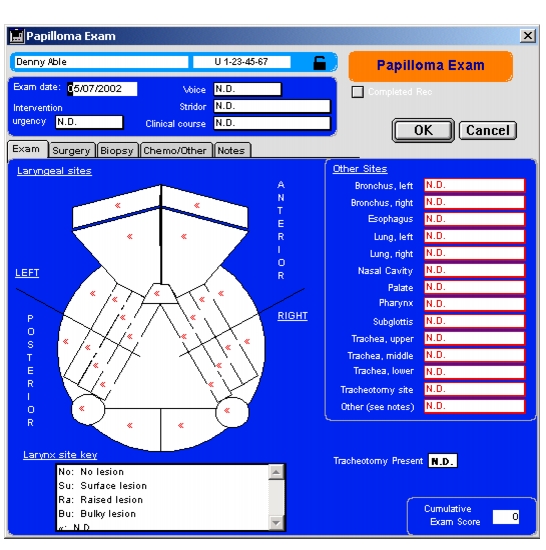
The Papilloma Exam form is designed for rapid data entry of the subject's current status as well as subsequent surgeries, chemotherapy or other treatment. By using the interactive graphic that displays laryngeal anatomic subsites, you can quickly document examinations and procedures.
You create a new Papilloma Exam form, or open an existing form, from the Exam\Treatment tab of the Subject Studies form.
To enter papilloma exam and treatment dataThe form has five tabs: Exam, Surgery, Biopsy, Chemo/Other and Notes.
All the data entry boxes are initially set to "N.D." (not done) to distinguish them from "No" answers.
The anatomic graphic depicts 25 laryngeal sites, divided into anterior and posterior and left/right quadrants. Each site is initially marked with a "<<" to denote N.D. or not done. If you pass the cursor over one of these sites, a box appears with the site's name. Clicking the site will display the data entry choices from a pop-up list. The Laryngeal Key box at the bottom of the form explains the shorthand laryngeal site displays.
In the example at right, the left anterior true vocal cord site (TVC), anterior commissure and both anterior and posterior right TVC sites have been filled out with a bulky lesion selection.
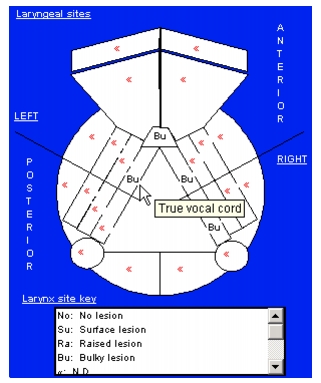
If no other sites are involved you can quickly enter "No" for the rest of the sites by selecting the Papilloma > Change N.D. to No menu item.
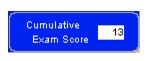
Note that the RRP cumulative score is automatically calculated and displayed in the lower right corner.
Selecting the Surgery tab allows you to use the same type of graphic to enter data about surgical treatment.
In the same manner, the Biopsy and Chemo/Other navigation tabs will display the appropriate pages, allowing you to enter biopsy and chemotherapy data using the same anatomical graphic and pop-up lists.

You can save notes in database records by clicking the Notes tab and typing in the text box.
With the Papilloma Exam form still active on your screen, you can choose to print out the exam or treatment pages by selecting File > Print Exam from the top menu.
To save the record, click OK.
|
Otobase Otobase Web Site Voice: (206) 221-2430 Fax: (206) 221-5152 otobase@u.washington.edu |