
Corrupted files
From time to time computer files may become corrupted. This can happen for many reasons, including power surges, hardware problems and computer viruses, along with others.
You may be able to repair a corrupted Otobase file by using the 4D Tools application. 4D Tools allows you to diagnose and repair corrupted data and structure files. If you are using Otobase Server, the 4D Tools were installed with the program. If you are using the standalone version of Otobase, you can download the 4D Tools application and documentation at from 4D at http://www.4d.com.
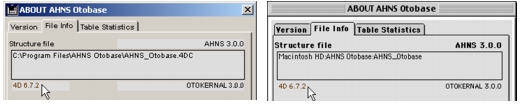
Download the version of 4D Tools compatible with the 4D version associated with Otobase. To find out the 4D version number, do one of the following:
|
Otobase Otobase Web Site Voice: (206) 221-2430 Fax: (206) 221-5152 otobase@u.washington.edu |