
Reassigning passwords when upgrading (pre-Version 2.5)
Before Otobase version 2.5, login names and passwords resided only in the program's structure file. Now, encrypted password information is stored in each data file as well as the structure file. So if you are upgrading from a version before Version 2.5, you will need to manually reassign all user passwords, and when users log in for the first time they will be required to change their password. After that, when you upgrade to a new version the passwords will be automatically updated from the data file.
To reassign user passwords when upgrading to a new version (pre-Version 2.5)
- Follow the steps outlined in Opening Otobase.
- Enter the initial administrator login name (see Initial passwords for a structure file).
You will be presented with a dialog asking if you would like to synchronize the structure and data files.- Select Yes.
The database will restart itself after synchronizing.- Log in again as administrator using the same initial password. At this time you will be required to change your password to continue.
- Select File > Provider Info.
- From the Provider List form, open the Provider Information form by selecting a provider and double-clicking on the name in the list.
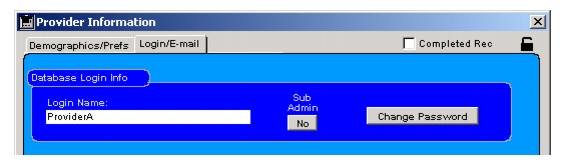
- From the Login/E-mail tab of the form, verify the login name for the provider and click Change Password.
- Enter a password and click OK.
You will be asked to re-enter the password for verification. Do so and click OK.- Click OK on the Provider Information form, then select another provider by double-clicking on the name in the list.
When a user logs in for the first time, he or she will be asked to change passwords to complete the synchronization process.
|
Otobase Otobase Web Site Voice: (206) 221-2430 Fax: (206) 221-5152 otobase@u.washington.edu |