
Adding and removing a group of subjects
Otobase also allows the administrator and subadministrators to add a group of subjects to a Provider record, or remove a group, using a menu item attached to the Provider record. This can also be done individually (see Assigning Providers and Clinical Groups).
To add a group of subjects to a provider
- From the Provider List, double-click on a provider's name to open the Provider Information form.
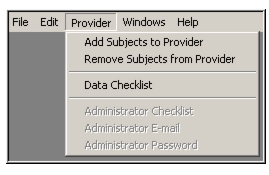
- Select Provider > Add Subjects to Provider to open a Search for Subjects form.
- Search for the set of subjects you wish to add and drag it to the Drop Selected Subject Set to assign all subjects in the set to the provider.
To remove a group of subjects from a provider
- From the Provider List, double-click on a provider's name.
The Provider Information form opens.- Select Provider > Remove Subjects from Provider.
A Search for Subjects form opens.- Search for the set of subjects you wish to remove and drag it to the Drop Selected Subject Set box on the form.
All subjects in the set are removed from the provider.Note: For more information on how to search for a set of subjects, Searching.
|
Otobase Otobase Web Site Voice: (206) 221-2430 Fax: (206) 221-5152 otobase@u.washington.edu |