Alert
Alerts are semantic messages that intentionally disrupt a user's workflow to notify them about issues that require action or provide information relevant to a particular task or page section. For quick, non-critical messages that disappear on their own, use a Toast.
Anatomy
Sizing
Alerts should occupy the full width of their parent container, usually a section or module on a page.
Text
Alerts contain a message which should communicate the following:
- Why the Alert is there, or what issue exists that needs attention.
- If the Alert requires user action, how to resolve it (with a CTA if applicable; see below).
Color
Alerts always carry a semantic meaning with a corresponding color: critical (red), warning (yellow), or info (blue). Refer to the Solstice Semantic Color Palette for appropriate values.
Dark Mode Support
Alerts must maintain proper contrast in order to be readable in both light and dark modes. By default, the component will update to appropriate colors within the semantic color palette.
Below are the primitive color values (100-900) for each of the elements within an Alert. The warning colors are shown as an example, but the primitive values apply to each of the semantic colors.
| Property | Light Mode (default) | Dark Mode |
|---|---|---|
background(required) | 100 | 900 |
border | 200 | 700 |
element | 800 | 300 |
Variants
Danger
Alerts with the danger variant are of the highest importance, and communicate that an item needs immediate attention, that a process is blocked, or that there has been an error. Whenever possible, danger Alerts should include a call to action to help the user resolve the issue.
<div class="alert alert-danger small" role="alert" aria-live="polite" aria-atomic="true">
  <i class="bi-exclamation-octagon-fill me-1"></i> Critical Alert
</div>
<BAlert variant="danger" :model-value="true" class="small">
  <i class="bi-exclamation-octagon-fill me-1"></i> Critical Alert
</BAlert>
Warning
Alerts with the warning variant communicate items or statuses that may have future consequences and require attention, but are not currently causing an error or blocking a process. Whenever possible, warning Alerts should include a call to action to help the user learn more about the issue.
<div class="alert alert-warning small" role="alert" aria-live="polite" aria-atomic="true">
  <i class="bi-exclamation-triangle-fill me-1"></i> Warning Alert
</div>
<BAlert variant="warning" :model-value="true" class="small">
  <i class="bi-exclamation-triangle-fill me-1"></i> Warning Alert
</BAlert>
Info
Alerts with the info variant communicate useful (but non-critical) information to help the user better understand the current context, such as announcements about upcoming processes.
<div class="alert alert-info small" role="alert" aria-live="polite" aria-atomic="true">
  <i class="bi-exclamation-circle-fill me-1"></i> Info Alert
</div>
<BAlert variant="info" :model-value="true" class="small">
  <i class="bi-exclamation-circle-fill me-1"></i> Info Alert
</BAlert>
Success
Alerts with the success variant communicate... Lorem ipsum dolor sit amet consectetur adipisicing elit. Tempore sunt reiciendis fugit placeat, deleniti atque eos architecto modi sit nulla ullam ipsa quam eius nihil earum debitis ad? Earum, et.
<div class="alert alert-success small" role="alert" aria-live="polite" aria-atomic="true">
  <i class="bi-check-circle-fill me-1"></i> Success Alert
</div>
<BAlert variant="success" :model-value="true" class="small">
  <i class="bi-check-circle-fill me-1"></i> Success Alert
</BAlert>
Options
Call to Action
Whenever possible, Alerts should provide direct access to relevant actions needed to resolve them. Do this by adding a call to action with has-cta="true", and specifying a URL with cta-url and a label with cta-label. The CTA should provide a link to an appropriate page where the issue can be resolved. Alerts may only have one call to action including one relevant link.
In general, critical and warning Alerts should include calls to action whenever possible.
<div class="alert alert-danger small" role="alert" aria-live="polite" aria-atomic="true">
  <i class="bi-exclamation-octagon-fill me-1"></i> Critical Alert
  <a href="/" class="btn btn-danger btn-sm rounded-3 position-absolute top-50 end-0 translate-middle-y me-2">Call to action</a>
</div>
<BAlert variant="danger" :model-value="true" class="small">
  <i class="bi-exclamation-octagon-fill me-1"></i> Critical Alert
  <BLink class="btn btn-danger btn-sm rounded-3 position-absolute top-50 end-0 translate-middle-y me-2" to="/">Call to action</BLink>
</BAlert>
Dismiss button
By default, Alerts are not dismissible from the page. They will remain in the interface until the issue is resolved or is no longer relevant. For Alerts with non-critical information, particularly info Alerts such as announcements, dismissibility may be enabled. When the dismissible prop is passed, an 'x' icon will allow users to remove it from the page.
In general, critical and warning Alerts should not be dismissible.
<div class="alert alert-info alert-dismissible small" role="alert" aria-live="polite" aria-atomic="true">
  <i class="bi-exclamation-circle-fill me-1"></i> Info Alert <button type="button" class="btn-close" aria-label="Close"></button>
</div>
<BAlert variant="info" dismissible :model-value="true" class="small">
  <i class="bi-exclamation-circle-fill me-1"></i>Info Alert
</BAlert>
Placement
Position
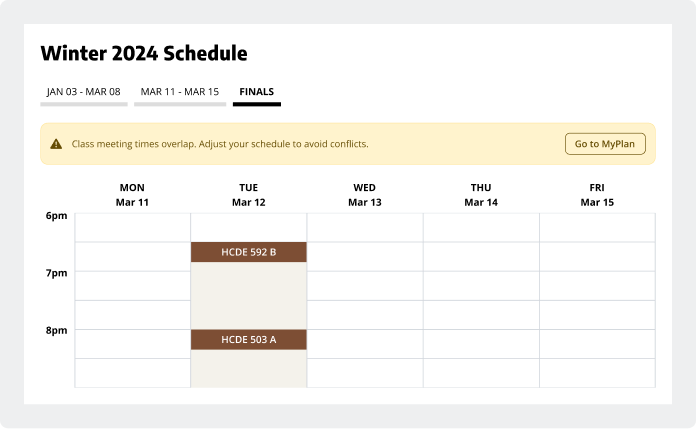
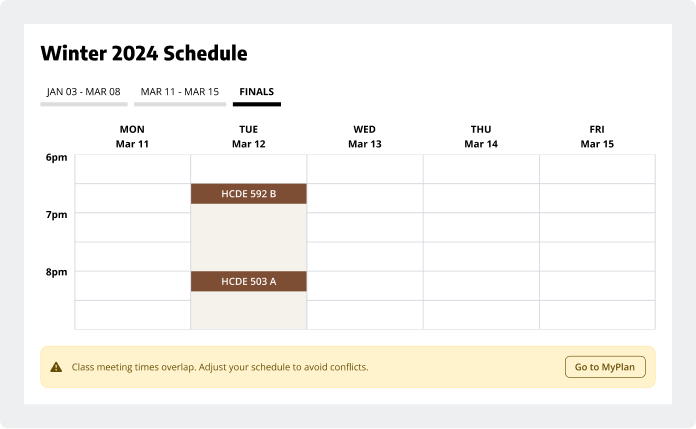
Alerts should appear in the section in which they are relevant, directly under the appropriate heading. In most cases, this will be directly under a section header (when the Alert applies to the whole section) or under a tab group (when the Alert applies only to the tab selected).
Stacking
In cases where there are multiple Alerts shown at the same time, they should stack vertically with the highest priority Alert on top (from top to bottom: critical Alerts, warning Alerts, info Alerts). In this situation, Alerts should remain at the top of the most relevant section and push other content down.
States
Alerts, when visible, only have one state. When an Alert has a call to action, the embedded outline button element should have a functional hover state.
Usage
Use Alerts for important, temporary messages
Alerts draw attention and disrupt the user's workflow. They are persistent (including across page loads), and will remain on the page until they are resolved or are not longer relevant. For Alerts that are dismissible, they will remain on the page until the user clicks the dismiss button.
Use Alerts for messages like:
- Warnings and errors
- When further action is required from the user
- For timely, important information or announcements (make these dismissible)
Help the user resolve issues with a call to action
Give enough detail to convey the message, and use a call to action to direct the user to a page where they can resolve the issue if possible (especially for critical and warning Alerts).
Be concise and link to additional information
Alerts should be no more than 1-3 sentences, but can expand to fit any amount of text. Give enough detail to convey the message, and use a call to action to direct the user to a page where they can learn more about the issue.
Accessibility
Assistive technology & keyboard functionality
Alerts include the ARIA role="alert" by default, and should automatically be readable by screen readers and other assistive technologies. Ensure that the component works with these technologies as expected.
Alerts with calls to action or dismiss buttons should be completely navigable by keyboard alone; the Alert itself will not receive focus, but the interactive children must. Check to make sure that any interactive elements are accessible via keyboard and that they behave as expected.
When Alerts are dismissed or resolved, they disappear from the page structure (read Bootstrap's documentation on this). The Alert component is configured to set focus to the top of the section in which the Alert was present. Check to make sure that after an Alert is dismissed, focus is set to a predictable location.
Technical Implementation
| Property | Values | Description |
|---|---|---|
variant | critical / warning / info | stringIndicates semantic function (applies color and icon) |
is-dismissable | true / false | booleanAdds close icon button to dismiss element. |
has-cta | true / false | booleanAdds CTA link with button appearance. |
cta-url | stringDestination URL for CTA [when has-cta="true"]. | |
cta-label | stringLabel for for CTA [when has-cta="true"]. |