Voice & Tone
Voice and Tone establish a uniform and easily identifiable communication style, promoting a clear, cohesive, and contextualized user experience. Voice, like personality, is constant throughout our messaging, while tone, like emotions, is dynamic and depends on the context/situation.
Both voice and tone adhere to and follow the UW-IT Writing Style Guide and the UW Editorial Guide. Both of these resources should be explored, as they contain additional tips and guidance.
Voice
Voice - the consistent and recognizable communication style in messaging - is intended to align with the UW style and brand, and in addition, is designed to optimize usability, accessibility and inclusivity. The recommended voice is:
Conversational but professional
We communicate in a way that is easy to understand for a nontechnical audience - we write how people talk, as if we’re having a conversation. We avoid language that's overly opinionated, humorous, or trendy.
Clear and concise
We look for the simplest way to communicate information, without unnecessary jargon.
Informative
We provide information to users when they need it, helping them avoid errors, and explaining the impact of actions they may take.
Empathetic and inclusive
We ensure that messages are easily understood by a wide and diverse audience. We maintain a warm and approachable demeanor, fostering respect and understanding.
Tone
If voice is our brand’s personality, tone is the emotion expressed that conveys how users should interpret information. The right tone depends on the context, audience, and level of engagement required for effective communication.
Tone Map
Since tone will vary throughout a UI, this tone map demonstrates what tone could be used in the outlined use cases. Note that even this tone map is guidance and should be weighed with what the proper tone is for the context of use.
Tone map axes are:
- Ranging from detailed to concise
- Ranging from casual (friendly, fun) to formal (serious, authoritative)
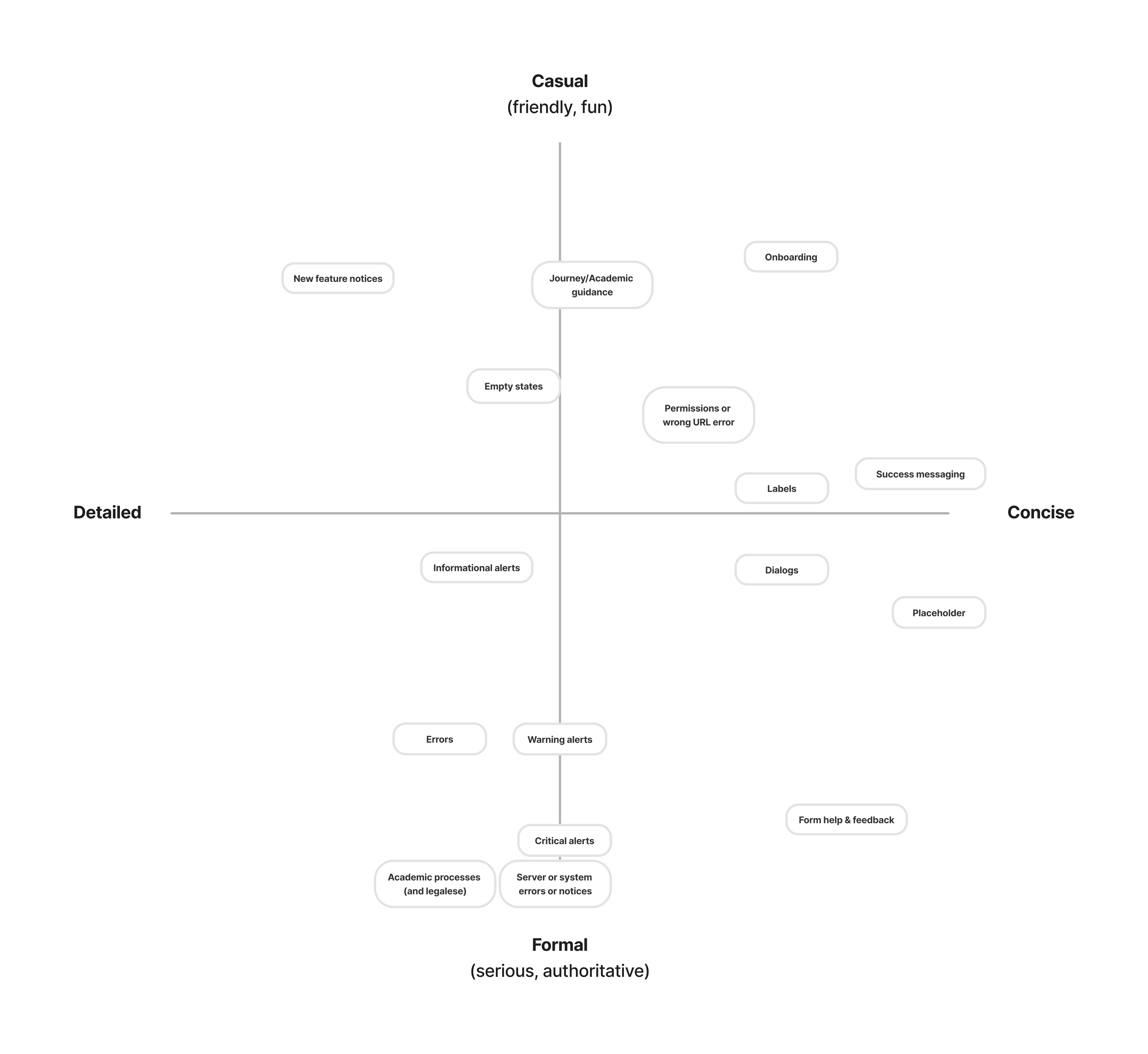
Tone Map items described below for accessibility purposes. Range values: evenly split between two ends, somewhat, moderately, and very
Forms
- Labels: somewhat casual, somewhat concise
- Empty states: moderately casual, somewhat detailed
- Errors: moderately formal, moderately detailed
- Placeholder text: somewhat formal, very concise
- Form help & feedback: moderately formal, somewhat concise
Workflow Messaging
- Onboarding: moderately concise, very casual
- Dialogs: evenly split between casual and formal, moderately concise
- New feature notices: very detailed, very casual
Academic Messaging
- Journey/Academic guidance: very casual, somewhat detailed
- Academic processes: A very formal, moderately detailed
Systems Messaging
- Permissions or wrong URL error: moderately casual, somewhat concise
- Server or system error: very formal, somewhat detailed
Situational/Semantic Messaging
- Success messaging: moderately casual, very concise
- Informational alerts: evenly split between casual and formal, moderately detailed
- Warning alerts: moderately formal, somewhat detailed
- Critical alerts: very formal, somewhat detailed