Toast
Toasts give timely feedback about non-critical information that does not require further action. In Solstice, Toasts are primarily used to communicate success and confirmation messages with minimal disruption, and they dismiss automatically. For intentionally disruptive messages communicating critical information, use an Alert.
Anatomy
Sizing
Toasts occupy a fixed width. By default, their height accommodates one line of text; Toasts can expand to fit additional lines, but text length should be kept to one line when possible. Since Toasts sit above page content, their size neither affects nor is affected by other elements in the markup.
Color
Alerts always carry a semantic meaning with a corresponding color: danger (red), warning (yellow), or info (blue). Refer to the Solstice Semantic Color Palette for appropriate values.
Dark Mode Support
Toasts must maintain proper contrast in order to be readable in both light and dark modes. By default, the component will update to appropriate colors within the semantic color palette.
Icon
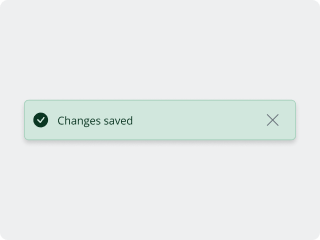
Toasts with the success variant contain a corresponding semantic icon. This icon always appears to the left of the text. Since they have no semantic meaning, toasts with the neutral variant do not contain an icon.
Dismiss Button
While toasts will disappear after a specified time automatically by default, they also contain a button to dismiss them manually. This button (an 'x' icon) always appears to the right of the text.
Shadow
Toasts sit above page content, so they use a shadow to communicate elevation. By default, Toasts use the default shadow from Bootstrap'sbox-shadow utility classes.
Variants
Default
Toasts by default do not have a semantic color associated with them. For this reason, they are used in rare cases to convey timely, non-critical feedback.
<BToast v-model="active">
  <template #title>
    <div class="flex-fill">Title</div>
  </template>
  Body
</BToast>
Success
Toasts with the success variant confirm that simple user actions have completed as intended, and do not require additional attention. This variant carries the semantic color green.
<BToast v-model="active" variant="success">
  <template #title>
    <div class="flex-fill">Title</div>
  </template>
  Body
</BToast>
Placement
Position
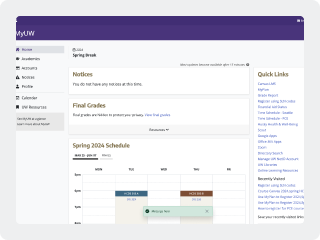
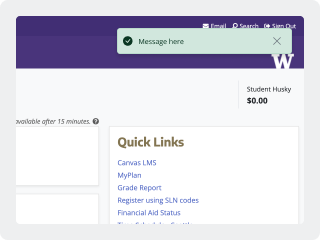
Place Toasts centered across the bottom of the window or viewport, with adequate padding (at least 16px/1rem) above the bottom.
On mobile, place Toasts centered across the bottom of the page viewport, above any browser UI.
On any given platform (and with as much cross-platform consistency as possible), Toasts should appear in the same place every time so that users know where to expect them.
Autohide
By default, the autohide property is true, and Toasts will disappear automatically after 5 seconds. For most simple messages, this should be sufficient. In special cases, autohide can be turned off or the delay can be extended. Do not show a Toast with a delay of less than 5 seconds, as there is a greater chance of it being missed.
Stacking
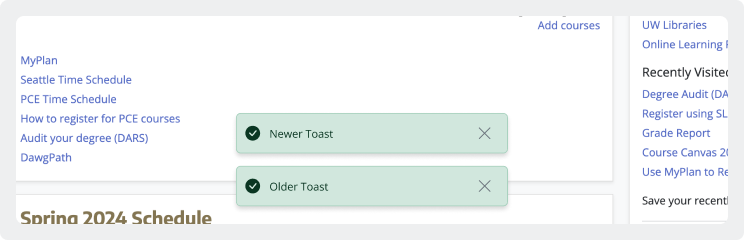
By default, multiple Toasts stack on top of each other, with the most recent message on top. When a Toast disappears, others move down to occupy the space closest to the bottom of the screen.
States
When visible, Toasts only exist in one state. By default, the dismiss button (an x icon) should have a functional hover state.
Best Practices
Use Toasts for real-time confirmation and updates
Use Toasts for non-critical status updates that do not require further action on the part of the user and are not meant to disrupt their workflow. Toasts should provide helpful feedback about what's going on, but if a user misses a Toast, it should not prevent them from completing other tasks on the page.
Toasts should primarily be used to confirm the completion of actions (use the success variant). Examples include:
- When a course is added to or deleted from MyPlan
- When grades are successfully submitted
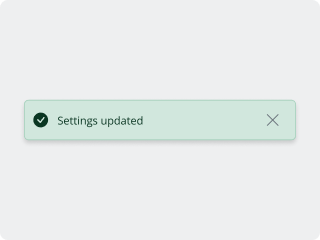
- When settings are updated
For notifications for which the success variant does not make sense, and when the information is not critical enough to be an Alert, use the neutral variant.
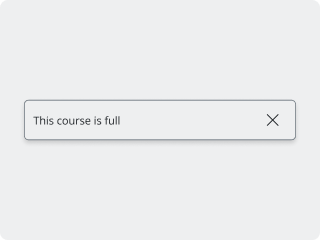
Keep messages to a few words
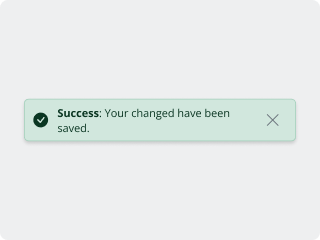
Toast text should be no more than a few words, and not more than one sentence. The text should communicate a simple message, usually confirming or indicating success with no further action needed.
If the message indicates critical information, and requires further action or explanation, consider using an Alert.
Assistive technology & keyboard functionality
Toasts must be generated within an existing aria-live region in order to be announced by assistive technologies; aria-live should be set to "polite". Read more about accessible structuring in Bootstrap's Toast documentation.
Like all elements, Toasts should be fully usable for those navigating the page by keyboard. Pressing `ESC` should dismiss Toasts.
Toasts do not receive focus and therefore should not include any links, buttons, or interactive content (with the exception of the dismiss button, whose function is assumed by the `ESC` shortcut). Additionally, dismissing a Toast (automatically or manually) should not change the user's focus.
Technical Implementation
| Property | Values | Description |
|---|---|---|
variant(required) | success / neutral | stringIndicates semantic function (applies color and icon) |
animation | true / false | booleanApply a CSS fade transition to the toast. |
autohide | true / false | booleanAutomatically hide the toast after the delay. |
delay | 5000 | numberDelay in milliseconds before hiding the toast. |